
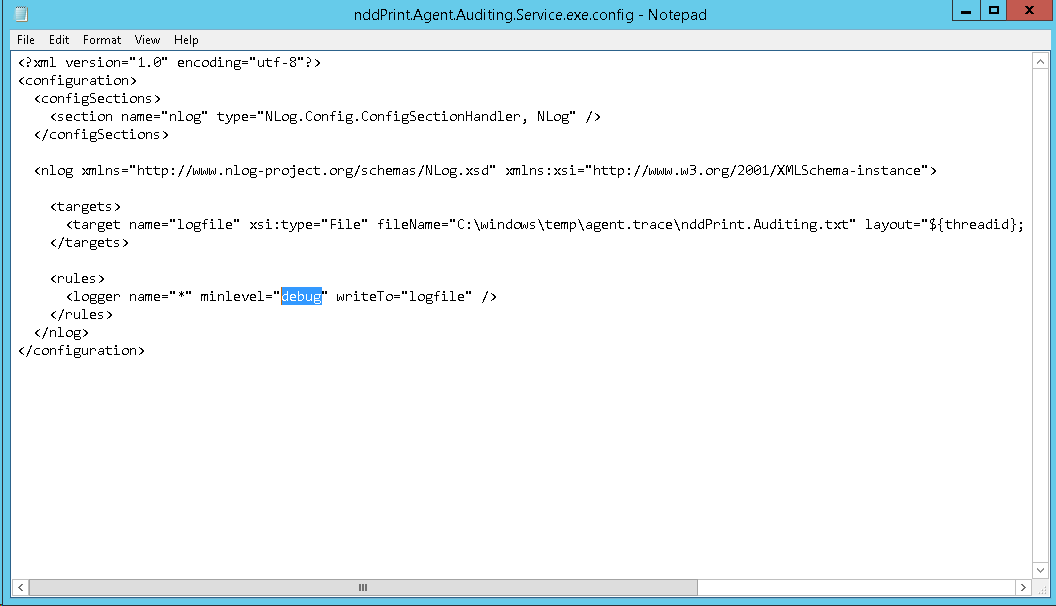
To enable traces > run the notepad as administrator > File > Open > go to the destination folder (installation location) >locate the file nddPrint.Agent.Auditing.Service.exe.config > Open > edit the required information > Save the file > Restart the NDD Print Agent Auditing service
Edit the information:
-
minLevel: Change the description of this property to one of the following options:
-
Off: Disabled;
-
Fatal: It lists the errors that caused an interruption in the solution operation;
-
Error: It lists errors that occurred at runtime and that generated unexpected conditions;
-
Warn: It lists situations that occurred at runtime, which are undesirable or unexpected, but not necessarily "wrong";
-
Info: It lists in detail the steps taken by the solution, at execution time;
-
Debug: It list in detail the steps taken by the solution, at runtime. Technical information.
-
ATTENTION
For the settings to be completed, it will be necessary to restart the service (services.msc) NDD Print Agent Auditing.