
Hello, these are the May 2024 Release Notes of NDD Print, we have a lot of news, and we hope you like it.
Here you can download the latest versions.
See a summary of all updates and click on the links to navigate each one.
NDD Print Host 5.58.7
APPROVALS
NDD Print MF and Client HP 5.25.5
FIXES
NDD Print MF and Client EPSON 5.4.0
NEW FEATURES
NDD Print Host 5.58.6
APPROVALS
NDD Print MF and Client Konica 5.7.12
FIXES
NDD Print Client, Access and Collector Lexmark 5.x
IMPROVEMENTS
NDD Print Portal 360 5.75.0
FIXES
IMPROVEMENTS
NDD Print Releaser 5.27.1
FIXES
NDD Print Host 5.58.7
Released on May 28
Approvals
Approved printers for collecting counters and network supplies
Approved models?
-
KONICA MINOLTA BIZHUB C368
-
RICOH SP C440DN
-
RICOH PRO C5210S
-
KYOCERA TASKalfa 3051ci
-
KYOCERA TASKalfa 3552ci
-
KYOCERA ECOSYS M6235cidn
-
KYOCERA TASKalfa 406ci
-
KYOCERA TASKalfa 308ci
-
KYOCERA TASKalfa 356ci
-
KYOCERA TASKalfa 2553ci
-
KYOCERA TASKalfa 2552ci
-
KYOCERA CS 2552ci
-
KYOCERA ECOSYS MA4000cix
NDD Print MF and Client HP 5.25.5
Released on May 24
Fixes
Accounting was not done when changing the printer's IP address
How did the problem happen? When trying to authenticate with the NDD Print Client or count prints from a device added by Hostname.
When did the problem happen? When printers were added by Hostname and had their IP changed.
What was done to fix it? We corrected the process of updating the printer information saved in a file in the NDD Print MF HP installation folder.
NDD Print MF and Client EPSON 5.4.0
Released on May 24
New features
Massive printer imports
What is the new functionality? Now, NDD Print MF EPSON allows the mass addition of printers via a CSV file.
What is the benefit of the new feature? This new feature further simplifies the process of configuring printers on your network, saving you time and effort.
How does the new feature work? Just fill in the import CSV file and the service will check the changes and import the printers into NDD Print MF EPSON. In the event of failures, a new file will be saved with the possible errors caused. Click here to find out more.
Observations?
-
When you save the file, NDD Print MF EPSON will start the import process, so make sure that all the information is completed and correct.
-
The import is finished when the file PrintersToImport is completely empty.
NDD Print Host 5.58.6
Released on May 24
Approvals
Approved printers for collecting counters and network supplies
Approved models?
-
HP LASER 107w
-
RICOH IM C4510
-
KYOCERA ECOSYS P3145dn
-
HP LASERJET FLOW E82660
-
HP COLOR LASERJET FLOW E87760
-
PANTUM M7310DW
-
PANTUM BM5200ADW Series
-
LEXMARK CX625adhe
-
OKIDATA ES8473 MFP
-
LEXMARK MX722adhe
-
KYOCERA TASKalfa 2554ci
NDD Print MF and Client Konica 5.7.12
Released on May 23
Fixes
An error occurred when accessing the NDD Print Client Konica
How did the problem happen? When the device was added to the NDD Print Releaser and its model was registered as Generic, the message "The object reference wasn't defined as an instance of the object" was displayed when authenticating to the Konica embedded.
Where was the problem? When sending the manufacturer's information to the NDD Print MF Konica.
What was done to fix it? We have corrected the way NDD Print MF Konica will treat the manufacturer name information received by NDD Print Releaser.
NDD Print Client, Access and Collector Lexmark 5.x
Released on May 17
Improvements
Compatibility of NDD Print Client, Access and Collector functionalities
What purpose? To increase the range of models (7x) compatible with the functionalities of the NDD Print Client, Access and Collector Lemark components.
What was done? We approved the functionalities in the Compatibility Guide for the following models:
-
CS963
-
CX833
-
CX961
-
CX962
-
CX963
-
XC8355
-
XC9635
-
XC9645
-
XC9655
NDD Print Portal 360 5.75.0
Released on May 17
Fixes
Administrator user could not change his own Authentication settings
How did the problem happen? Users authenticated as Administrator were unable to change their authentication settings.
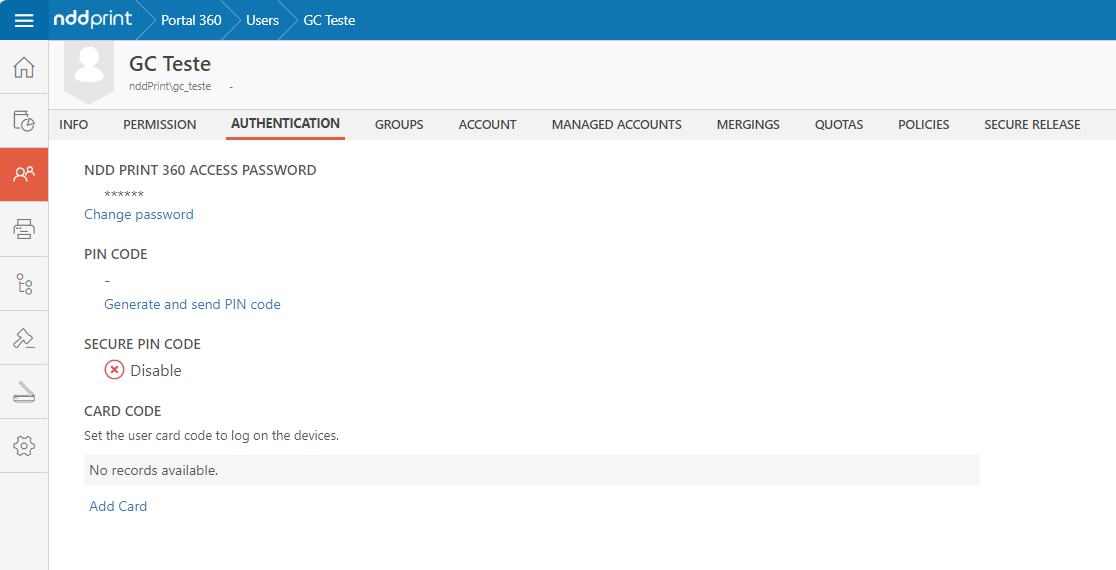
What was done to fix it? We have corrected the profiles so that Administrator users can make changes to their own Authentication settings.
Improvements
Improvements to Quota addition rules
What purpose? Improving the performance of the quota functionality in NDD Print Portal 360.
What was done? We have limited the quota balance setting, now each Control Unit will have its limit as shown in the table below:
|
Limits by printers, groups or users |
|
|---|---|
|
Pages |
70.000 |
|
Color |
70.000 color/70.000 mono |
|
Currency |
7.000 |
|
Recurrence limits |
||
|---|---|---|
|
Control unit |
Daily |
Weekly/Monthly |
|
Pages |
10.000 |
70.000 |
|
Color |
10.000 color/10.000 mono |
70.000 color/70.000 mono |
|
Currency |
1.000 |
7.000 |
What will be affected? The configuration of quota limits in the Default Rule, Recurrence rules and the Addition of quota balances for users, printers, accounts and groups.
Observations? If you are already a customer and have quotas configured, the limit will not be active by default. You can activate it by contacting our support team.
If you are a new customer, this limitation will already be available.
NDD Print Releaser 5.27.1
Released on May 09
Fixes
Impressions from other users being released when using TCP Converter
How did the problem happen? When there was simultaneous release, some prints from other users were released together with those of the releasing user.
When did the problem happen? When using secure release with TCP Converter.
What was done to fix it? We corrected the TCP Converter calls for environments with simultaneous releases.