
Hello, these are the march 2026 Release Notes of NDD Print, we have a lot of news, and we hope you like it.
Here you can download the latest versions.
See a summary of all updates and click on the links to navigate each one.
NDD Print Agent - 5.30.13
FIXES
APPROVALS
NDD Print Host - 5.65.1
FIXES
APPROVALS
NDD Print MF HP - 5.31.5
FIXES
NDD Print Digital Shift Epson 5.0.9
FIXES
NDD Print Client Access Canon MEAP 5.1.2
FIXES
NDD Print Client Canon MEAP 5.1.1
FIXES
NDD Print Client Collector Kyocera – 5.1.2
IMPROVEMENTS
APPROVALS
NDD Print Host - 5.64.9
FIXES
NDD Print MF Epson - 5.9.2
IMPROVEMENTS
FIXES
NDD Print MF HP - 5.31.4
IMPROVEMENTS
FIXES
NDD Print MF Brother - 5.12.1
fixes
-
Error when using special character “&” in AD password in Scan to Folder
-
Insecure release in environments without hostname resolution
-
Incorrect call to NDD Print Releaser on printers configured with authentication only
NDD Print Agent - 5.30.13
Released on March 26, 2026
Fixes
Generation of the NSL file during monitoring
How did the problem happen?
The NSL file was not generated during monitoring.
When did the problem occur?
No monitoring of the NDD Print Agent.
Where did the problem happen?
The equipment was not returning a valid value for the description of one of the supplies. This failure caused the data entry process to be interrupted, preventing the file from being generated.
What was done to fix it?
A procedure has been implemented for these cases, specifying a default description when the equipment does not return this information.
Approvals
Approved printers for meter monitoring and USB supplies
-
BROTHER MFC-T910DW
-
EPSON WF-M5399
-
HP LASERJET E40040
-
HP LASERJET FLOW MFP E52645
-
TOSHIBA e-STUDIO409AS
-
RICOH - All models - If the serial number ends with ‘FIX’, append it to the GUID and use it as the serial number.
-
RICOH AFICIO MP C300
-
HP LASER 330¬335dw
-
HP LASER MFP 330¬355sdnw
-
KYOCERA ECOSYS P5026cdn
-
RICOH P 800
Equipment identified as incompatible with USB monitoring
-
BROTHER ADS-2800W
-
BROTHER ADS-4700W
-
CANON DR-S350NW
NDD Print Host - 5.65.1
Released on March 24, 2026
Fixes
Display of mono and color data from the A3 meter on an HP model
How did the problem happen?
The “Mono” and “Color” values for meter A3 were not displayed for the HP Color LaserJet Flow E87660 model.
When did the problem occur?
While performing monitoring of the meters via NDD Print Host.
What was done to fix it?
The method for capturing this information has been adjusted. Now, when the data is not available directly on the equipment, the system searches for it through an alternative method.
Approvals
Approved printers for meter reading and network supplies
-
ALARIS - All models
-
BROTHER-MFC-L6912DW
-
EPSON-WF-C878R
-
HP-COLOR LASERJET FLOW E87660
-
HP-LASER MFP 355sdnw
-
KONICA MINOLTA-BIZHUB C301i
-
XEROX-ALTALINK C8255
-
XEROX-ALTALINK C8230
-
XEROX-LTALINK C8245
NDD Print MF HP - 5.31.5
Released on March 23, 2026
Fixes
Security PIN and “Continue” button not accessible via touch
How did the problem happen?
With Secure PIN enabled, it was not possible to click on the Secure PIN field or the “Continue” button on printers with smaller screens (4.3” and 2.7”)
When did the problem occur?
When you enable PIN + Secure PIN authentication and try to enter the Secure PIN and click “Continue.”
Where did the problem happen?
On the HP NDD Print Client login screen, on printers with 4.3-inch and 2.7-inch screens.
What was done to fix it?
An adjustment was made to the interface on smaller screens, correctly repositioning the elements that were overlapping. As a result, the fields and buttons are now accessible again.
Printer reset when processing multiple documents
How did the problem happen?
After logging in, when accessing the list of pending documents, the printer might restart unexpectedly if the user clicked “OK” while the screen was already displaying 12 or more print jobs.
When did the problem occur?
Clicking “OK” triggered an additional background action that consumed more memory. Since the printer’s memory was already nearly at capacity due to the displayed documents, this additional action caused the system to be unable to handle the level of load, resulting in a reboot.
Where did the problem happen?
On the pending documents screen of the HP NDD Print Client.
What was done to fix it?
The additional call to the backend that occurred outside the main flow has been removed, reducing memory usage. The maximum number of documents displayed on the screen has also been adjusted:
-
Up to 15 documents on larger screens
-
Up to 10 documents on smaller screens (4.3”)
NDD Print Digital Shift Epson 5.0.9
Released on March 16, 2026
Fixes
Divergence in the title of scanned documents sent via email
How did the problem happen?
When scanning via ADF (Automatic Document Feeder) in a workflow that included title assignment and email sending, the title of the document sent in email did not match the title entered by the user during scanning on the printer screen.
When did the problem occur?
When scanning to email using an NDD Print Portal 360 scanning workflow, if the file ID and name were set to a customized value, the document title stored in the NDD Print Host’s ScanToFlow folder differed from the file name received via email.
What was done to fix it?
An adjustment was made to the scanning workflow to ensure that the title entered by the user on the printer screen is correctly captured and maintained throughout the entire process. As a result, the name defined during scanning is now correctly used in the stored file and in the document sent via email.
NDD Print Client Access Canon MEAP 5.1.2
Released on March 11, 2026
Fixes
Account selection feature causes infinite loop
How did the problem happen?
The system entered an infinite loop when only the Account option was enabled in the work assignment configuration using the corporate purpose.
When did the problem occur?
When the following configuration was used in NDD Print Portal 360: Settings > Job Assignment > Accounts.
What was done to fix it?
An internal fix was implemented to prevent looping behavior when only the Account option is enabled.
NDD Print Client Canon MEAP 5.1.1
Released on March 11, 2026
Fixes
Account selection feature causes infinite loop
How did the problem happen?
The system entered an infinite loop when only the Account option was enabled in the work assignment configuration using the corporate purpose.
When did the problem occur?
When the following configuration was used in NDD Print Portal 360: Settings > Job Assignment > Accounts.
What was done to fix it?
An internal fix was implemented to prevent looping behavior when only the Account option is enabled.
NDD Print Client Collector Kyocera – 5.1.2
Released on March 10, 2026
Improvements
Update to the data collection component (Collector)
What is the objective?
Update the NDD Print Collector component for Kyocera equipment.
What has been done?
The JAR files used by Collector have been updated to the latest version, and necessary adjustments have been made to correct errors identified after the component update.
What will be affected?
The Kyocera NDD Print Client Collector module. There will be no changes to the module configurations.
Approvals
Approved printers
-
KYOCERA ECOSYS M3145IDN
-
KYOCERA ECOSYS MA5500ifx
NDD Print Host - 5.64.9
Released on March 9, 2026
Fixes
Correction in the display of meters for the Epson WF-C878R model
How did the problem happen?
Some meters were not being displayed correctly. The problem occurred when the TotalPrint meter was missing, which caused the total meter to be interpreted as negative.
When did the problem occur?
During monitoring of equipment meters for the Epson WF-C878R model.
What was done to fix it?
An adjustment was made to the way meters are displayed and validated. Now, when the system identifies an inconsistency in the values reported by the equipment, the collection of this information is interrupted.
NDD Print MF Epson - 5.9.2
Released on March 6, 2026
Improvements
Postgres version update
What is the objective?
To update Postgres to fix failures in previous versions.
What has been done?
Postgres has been updated to version 17.9.1.
Fixes
Incompatibility with integrated application and when adding compatible models
How did the problem happen?
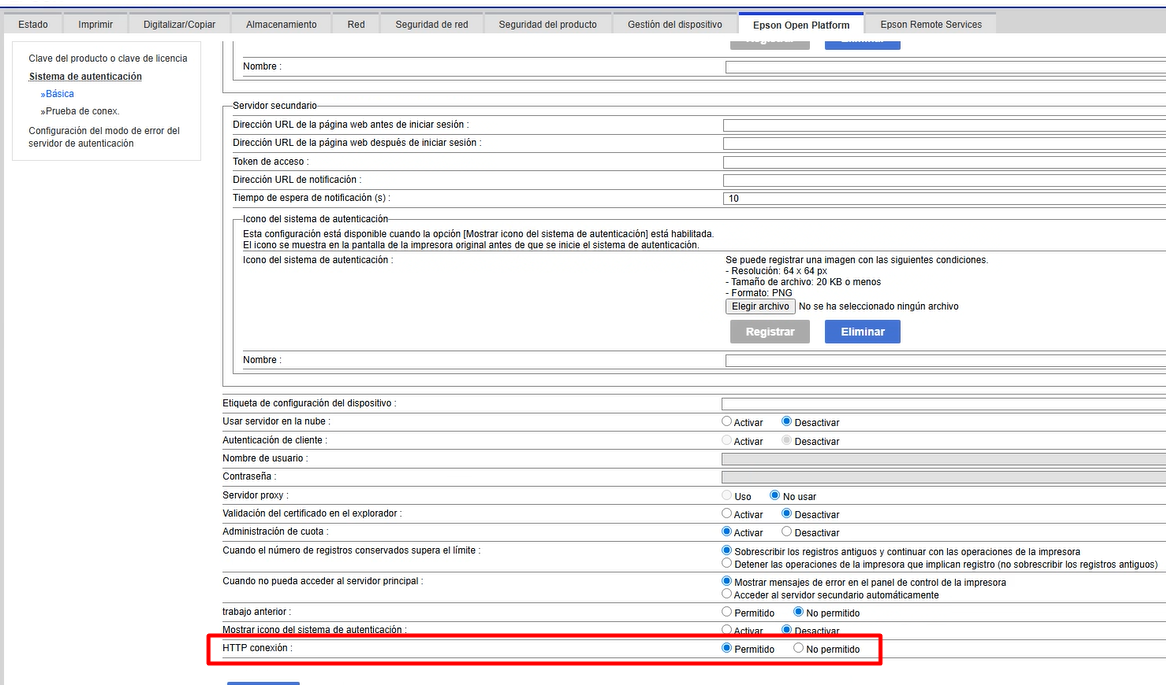
When attempting to add a printer in NDD Print MF Epson, an “incompatible printer” message was displayed when the equipment had the “HTTP Connection” option disabled in the Epson Open Platform settings.
When did the problem occur?
During the attempt to add a printer in MF Epson when the “HTTP Connection” option was disabled in the equipment settings.
Where did the problem happen?
On the printer addition screen in NDD Print MF Epson.
What was done to fix it?
An adjustment has been implemented in the printer configuration process to ensure that the HTTP connection is enabled automatically.
NDD Print MF HP - 5.31.4
Released on March 4, 2026
Improvements
Postgres version update
What is the objective?
To update Postgres to fix failures in previous versions.
What has been done?
Postgres has been updated to version 17.9.1.
Fixes
Loop on the authentication screen when no printer is found (PrinterNotFoundException)
How did the problem happen?
Authentication could not find the printer (PrinterNotFoundException) and the user was repeatedly redirected to the error screen.
When did the problem occur?
When the request arrived with the IP address of an internal/local adapter on the machine itself (not exactly 127.0.0.1 or : (line 1)), especially in a scenario where the host/address was different from the one configured.
Where did the problem happen?
On the authentication screen.
What was done to fix it?
Local IP detection for internal adapters has been added, and the local treatment condition now also considers these local IPs. As a result, internal addresses are now processed as local hosts in the flow, preventing printer identification failures and breaking the loop to the error screen.
NDD Print MF Brother - 5.12.1
Released on March 2, 2026
Fixes
Error when using special character “&” in AD password in Scan to Folder
How did the problem happen?
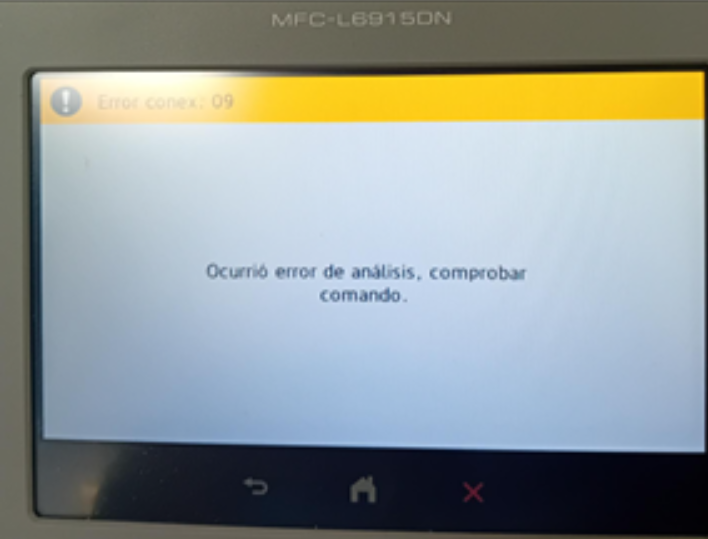
When the special character “&” was included in the Active Directory (AD) user password, specifically in the user configured in Tools > Settings > Scan Configuration > Storage Server Authentication, sending the XML generated during the process resulted in an error, preventing the operation from continuing and displaying the failure screen.
When did the problem occur?
When accessing Scan to Folder, a function active and configured in NDD Print Host.
What was done to fix it?
A fix was implemented that ensures that special characters in XML are properly escaped once at the entry point, preventing the generation of invalid XML.
Insecure release in environments without hostname resolution
How did the problem happen?
In environments without hostname resolution, when performing releases on equipment with the application installed (with the authentication URLs and NDD Print Releaser registered on the equipment/BSI) but which was not registered in the NDD Print MF Brother XML, the release was executed on the printer used by the user, but the job was printed on another printer.
When did the problem occur?
The problem occurred when the equipment was turned off or removed from the network and subsequently removed from NDD Print MF Brother. In this situation, the authentication and NDD Print Releaser URLs were not removed from the equipment. Thus, when reconnected to the network, the equipment continued to authenticate and allow secure release as normal.
However, as the equipment was no longer listed in the NDD Print MF Brother XML and there was no hostname resolution, the system directed the release to the first printer listed in the XML, resulting in printing on an incorrect device.
Where did the problem happen?
In the XML Printers of NDD Print MF Brother.
What was done to fix it?
A validation has been implemented to check whether the printer is registered in the NDD Print MF Brother database. If the equipment is not registered, the system displays a message to the user informing them that the printer is not registered in NDD Print MF Brother.
Incorrect call to NDD Print Releaser on printers configured with authentication only
How did the problem happen?
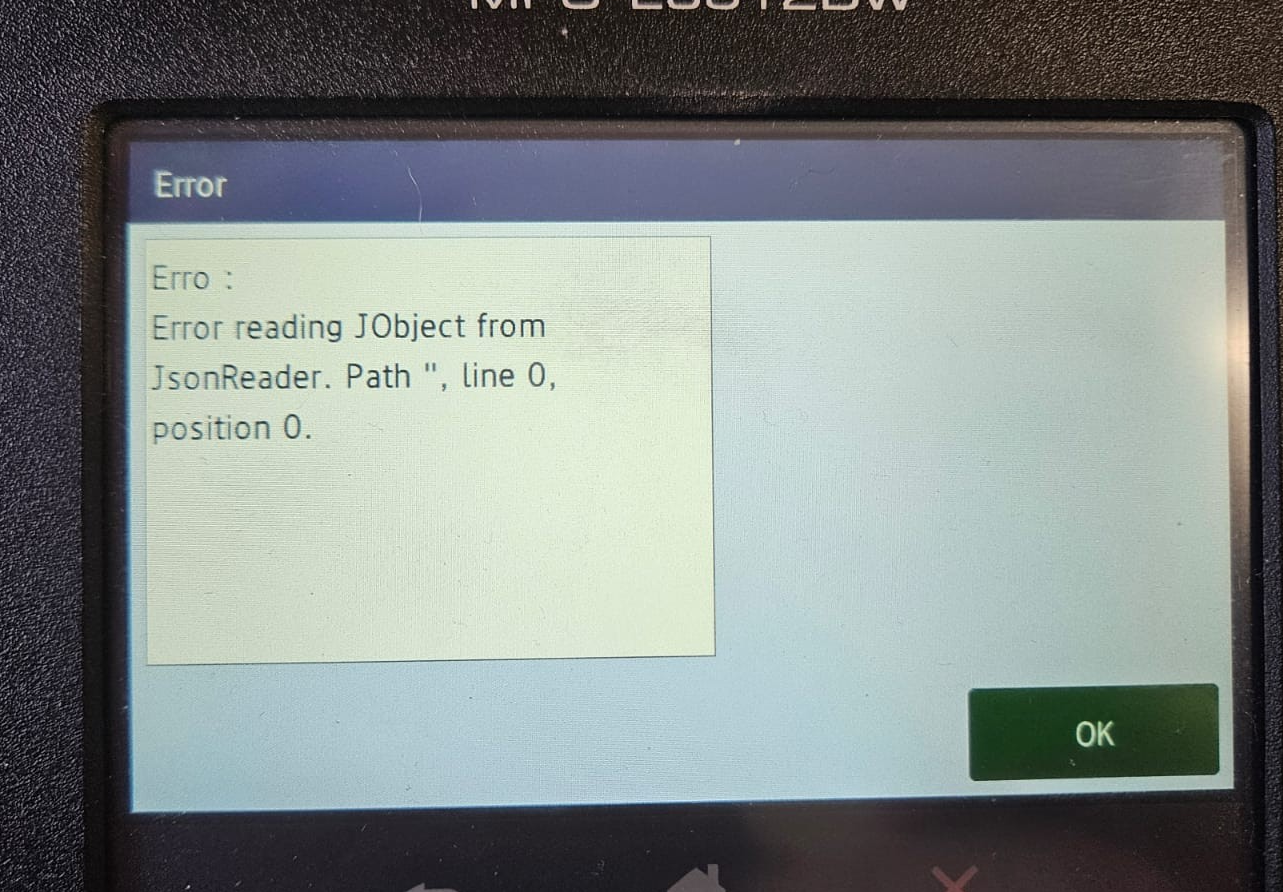
When performing authentication on the printer panel, on equipment configured with authentication only, and without the NDD Print Releaser module installed on the server, the system still made a call to NDD Print Releaser, even when the NDD Print Releaser option was disabled on the printer.
When did the problem occur?
The problem occurred during the authentication attempt on the printer panel. On equipment that only had authentication, the NDD Print Releaser address remained configured locally, and the NDD Print Releaser module was not installed on the server with NDD Print MF Brother Admin.
Where did the problem happen?
When attempting authentication on the equipment:
What was done to fix it?
The code logic has been adjusted to first check whether the NDD Print Releaser option is active on the printer (isReleaser) before making any calls to the module. This way, the call is only made when really necessary.