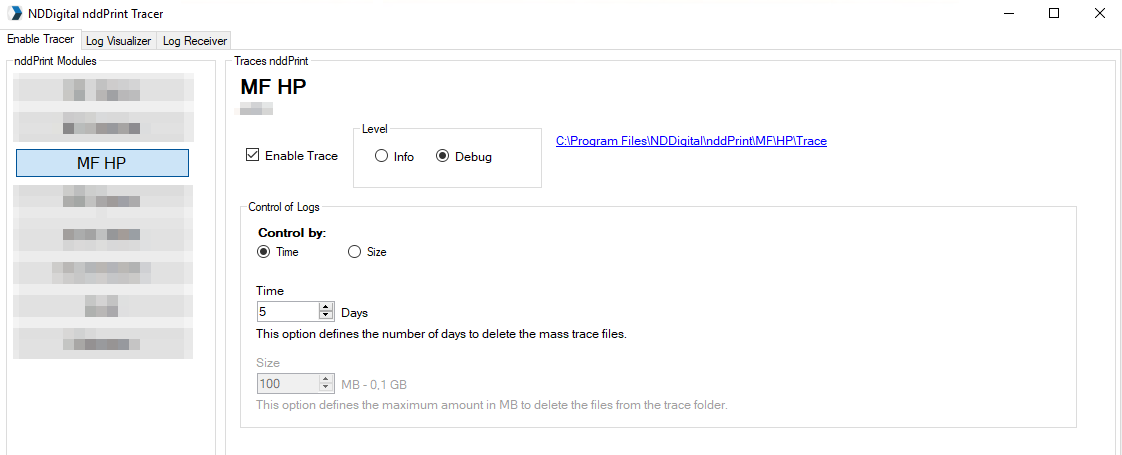
In this article, you will learn how to activate the NDD Print MF HP and Client HP Logs. This functionality allows you to analyze the operation of the component.
Activate Logs
-
Download the Tracer tool from NDD Print Resources
-
Open the Tracer tool, in the Enable tracer tab, select MF HP
-
Select Enable tracer and set the desired level
|
Level |
Level |
Content |
|---|---|---|
|
Debug |
1 |
Debugging of the application's behavior based on internal events of interest. |
|
Info |
2 |
Information highlighting the application's progress or lifetime events. |
-
Under Control by, select the type of control for recycling the Logs
-
Time - Logs will be deleted according to the period of days chosen
-
Size - The logs will be deleted according to the size in MB chosen
-
-
Click Apply
The NDD Print MF HP services will be restarted.
You can click on the directory that appears in the tool to access the logs.