
The NDD Print MF HP component provides total security management of HP devices approved by NDD Tech, offering the following functionalities:

Accounting
Responsible for collecting information on jobs being done on equipment.

Authentication
Controls access to documents retained on the server or to the device's native functions.

Pull print
Allows the release of a retained document once the access credentials have been validated.
Controlled copy
Manages copy jobs using quotas configured in NDD Print Portal 360.
You can consult our Manufacturer Compatibility Guide for detailed information on the compatibility of features, as well as the list of compatible printers.
NDD Print MF HP overview
NDD Print MF HP accounts printing, copying, scanning and faxing jobs and installs the NDD Print Client HP.
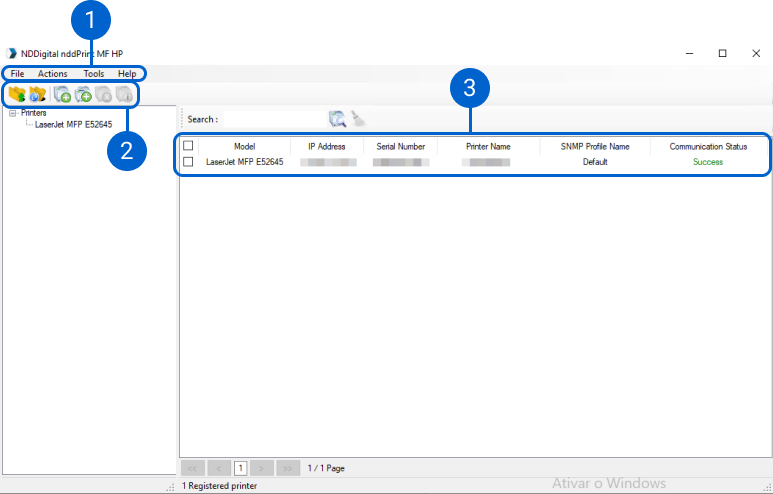
1. Menu
Here, you can access the settings for the NDD Print MF and Client HP component.
2. Quick actions
Here, you can perform quick actions, such as viewing or adding printers.
3. Printer list
Here, you can view the list and get some relevant information about the printers.
NDD Print Client HP overview
The NDD Print Client HP is installed on the printer via the NDD Print MF HP to control user access via authentication and allow the release of retained documents.
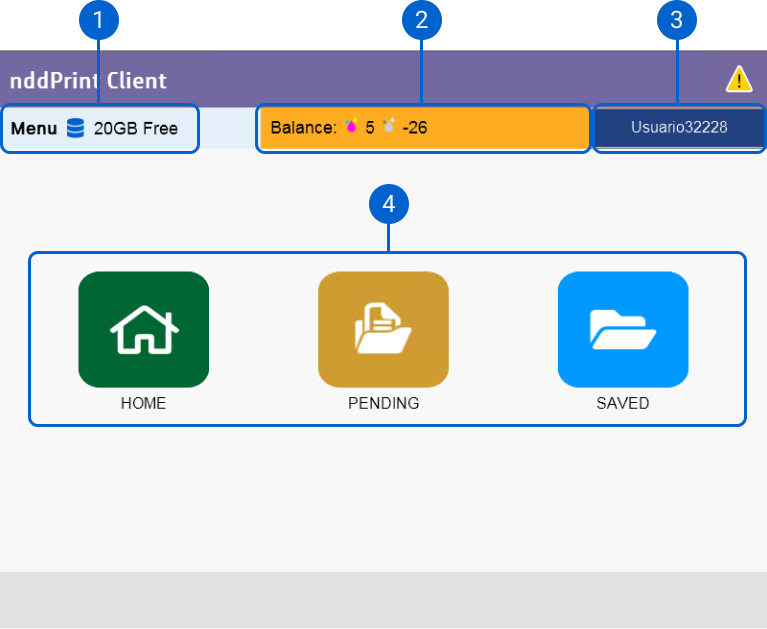
1. Disk space information
Here you can view the disk space information configured for the user.
2. Information on the quota balance
Here you can view the purpose and the quota balance available to the user.
3. Authenticated user
Here, you can view the authenticated username in the NDD Print Client.
4. Activated features
Here you can view the activated features.
Current version
NDD Print MF and Client HP is currently on version 5.31.
For more information on the history of new features and fixes, see the Release notes.
-
Best practices for NDD Print MF HP -
Requirements for installing NDD Print MF HP -
Installation of NDD Print MF HP -
Basic settings for NDD Print MF HP -
Configure Database -
HP Scanner Configuration on the NDD Print MF HP -
Add printer for accounting in NDD Print MF HP -
Add printer for authentication in NDD Print MF HP -
Add printer for secure release in NDD Print MF HP -
Add printer for controlled copy in NDD Print MF HP -
Configuring the Profile (access control) of HP printers -
Import printers into NDD Print MF HP -
Smart Exchange (Replacement printers in NDD Print MF HP) -
Change the printer features added in NDD Print MF HP -
Other NDD Print MF HP settings -
Document display restrictions -
Activate Logs in NDD Print MF HP -
NDD HP Printer Deploy -
Microsoft Entra ID Integration