
Filters provide flexibility to the user to find the information wanted, because they allow user to search for data in a simple or advanced way, applying criteria to refine the search.
Simple filter: It allows you to perform the search using only one information.
|
💡 EXAMPLE Performing the search only by "Admin": In this case the result shows all records containing the entered value. 
|
To clear the search, click on “X”
Advanced filter: It allows you to perform the search using more than one criterion, to refine the search.
Field: It allows you to define where the filter will be applied;
Operator: It lists the comparison types that can be made:
Contains;
Equals;
Starts with;
Ends with;
Not equals;
Not contains;
Not starts with;
Not ends with.
Value: It allows you to enter the information to be searched;
Logical separator: Using the logical separators "AND" or "OR" you can determine the relationship between the criteria entered in the filter.
New criteria.
|
💡 EXAMPLE Two-criteria search and logical separator "AND": In this case the result only shows the records that are in agreement with the two added criteria. 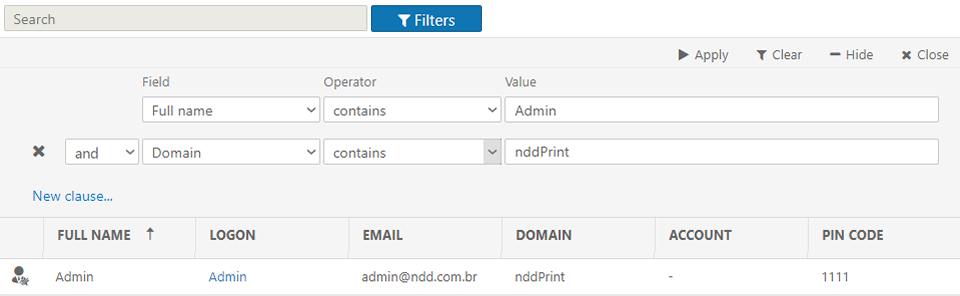
|
|
💡 EXAMPLE Two-criteria search and logical separator "OR": In this case the result shows all the records that match any of the two criteria added. 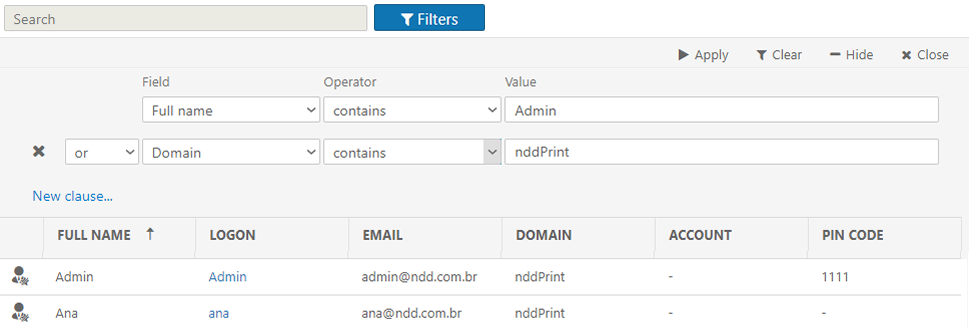
|