
To allow a user without administrative privileges to access the NDD Print Host, configure the solution shortcut:
-
Right-click the nddPrint.Host.Administration shortcut and select Properties.
-
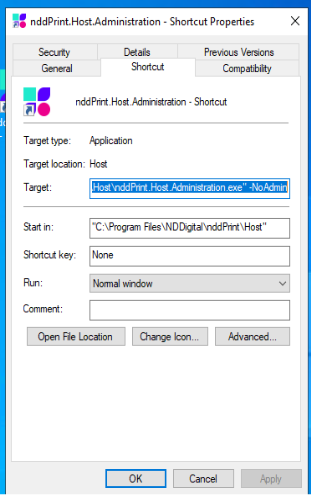
On the Shortcut tab, locate the Target field.
-
After the executable path, add the
--NoAdminparameter, as shown in the example:"C:\Program Files\NDDigital\nddPrint\Host\nddPrint.Host.Administration.exe" --NoAdmin
-
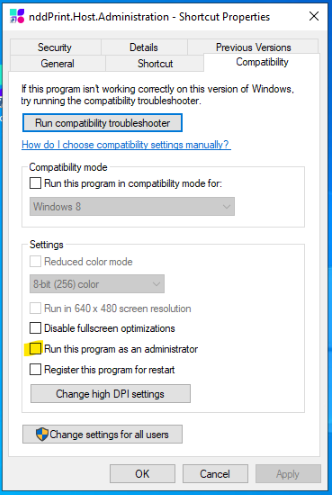
Access the Compatibility tab.
-
Uncheck the Run this program as an administrator option.
-
Click Apply, and then click OK.
Note:
Access with a user account that does not have administrative permissions is limited and may prevent you from applying certain settings on the NDD Print Host.
To apply all available settings, we recommend using a user account with Administrator permissions.