
Allows you to change advanced settings and manage specific rules via -config. from NDD Print Host.
To change a setting or manage rules open Windows Run and type in "Installation directory\NDDigital\nddPrint\Host\nddPrint.Host.Administration.exe"-config > Windows Registry tab
|
💡 EXAMPLE The path must be entered in double quotes " " followed by a dash - and the word config "C:\Program Files\NDDigital\nddPrint\Host\nddPrint.Host.Administration.exe"-config 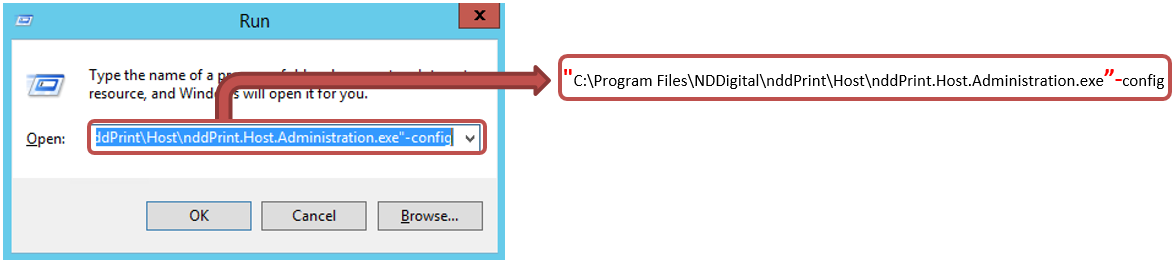
|
ATTENTION
-
Be careful when changing NDD Print Host advanced settings as these parameters will affect its operation.
-
The good performance of the solution also depends on server resources and the amount of registered devices.
Customize time intervals:
|
Value |
Min/Max Values |
Default |
Description |
|---|---|---|---|
|
Full NSL generation interval (in minutes) |
Min: 60 Max: 1440 |
240 |
Defines the interval (in minutes) at which a complete reading of counters and supplies will be performed on registered devices. |
|
NSL generation interval with supplies only (in minutes) |
Min: 20 Max: 1440 |
60 |
It defines the interval (in minutes) at which a reading of supplies will be performed on registered devices only. |
|
Event monitoring interval (in seconds) |
Min: 30 Max: 300 |
30 |
It defines the interval (in seconds) in which an event reading will be performed on registered devices. |
|
Per-thread data monitoring timeout (in seconds) |
Min: 30 Max: 300 |
30 |
It defines the time (in seconds) of monitoring equipment timeout. |
|
Time for the event to take effect (in minutes) |
Min: 8 Max: 30 |
10 |
It defines the time (in minutes) for the event to take effect and send to NDD Print MPS after the first occurrence of the event is logged. |
|
Time for event to go to history (in minutes) |
Min: 4 Max: 15 |
5 |
It defines the interval (in minutes) for the event to be recorded in the event history, if it does not remain active until it becomes effective. |
|
History NPA generation interval (in hours) |
Min: 3 Max: 10 |
4 |
It defines the interval (in hours) for sending history events to NDD Print MPS. |
|
WS submission request size (KB) |
Min: 25 Max: 100 |
50 |
It defines the maximum size (in KB) of the data packet that will be sent to NDD Print Portal 360 and NDD Print MPS. |
|
NPA submission verification interval (in minutes) |
Min: 1 Max: 10 |
1 |
It defines the interval (in minutes) for checking the sending of events to NDD Print MPS. |
|
NPL/NSL check interval (in minutes) |
Min: 1 Max: 10 |
1 |
It defines the interval (in minutes) of checking NPL/NSL submissions for NDD Print Portal 360 and NDD Print MPS. |
|
Number of simultaneous threads in monitoring (in units) |
Min: 1 Max: 200 |
150 |
It defines the number of printers that will be monitored simultaneously by the NDD Print Host. |
|
Maximum number of printers per NSL (in units) |
Min: 50 Max: 500 |
200 |
It defines the number of different printers that can be inserted in the same NSL for sending to NDD Print MPS. |
|
LDAPS timeout |
Min: 1 Max: 120 |
30 |
It defines the time (in seconds) of LDAP requests timeout for the AD User Import Wizard and for the old authentication. |
|
Port for data collection via HTTP |
|
80 |
It defines the default port for data collection via HTTP when monitoring printers. |
|
Remote settings check interval (in minutes) |
Min: 10 Max: 1440 |
240 |
When printer administration is performed by NDD Print MPS, it allows defining the interval (in minutes) in which the monitoring settings will be synchronized with NDD Print MPS. |
|
Monitoring information sending interval (in minutes) |
Min: 10 Max: 1440 |
240 |
It defines the interval (in minutes) at which monitored printers will be sent to the NDD Print MPS. |
|
Enable forced time zone using TimeZoneID |
|
|
It defines the Timezone ID to monitoring files timezone. This configuration is currently not functional. |
|
Enable not sending equipment location and contact |
|
False |
It disables sending location and contact data in NSL files. |
|
Enable scan flow send failure notification email |
|
False |
It sends a notification email to the user who performed the scan stream, in case it fails to send it to the destination. |
|
Reset monitoring intervals |
|
|
It erases the equipment's last monitoring data so that a new monitoring can be carried out afterwards. |
|
Database maintenance |
|
|
If you are using a SQLite database and the registry key "EnabledBaseBackUp" is created with the value "True", the NDD PrintHost database will be backed up and a database storage integrity and optimization check will be performed. |
|
Date format maintenance |
|
|
It changes the date of imports and printer search to a default value. This option is used to fix integrity issues in the date format of these settings. |
|
Wait Interval for SNMP Version 3 Request (in milliseconds) |
Min: 0
|
0 |
When using SNMP V3, it allows you to configure a time interval (in milliseconds) between each SNMP call made to the printer. |
|
Use PING test to perform monitoring |
|
False |
When enabled, performs a PING test for each printer at the start of monitoring. |
|
Enable monitoring of counters and supplies |
|
True |
When enabled, it monitors registered equipment counters and supplies. |
|
Enable event monitoring |
|
True |
When enabled, it performs event monitoring of registered equipment. |
|
Enable sending NSL files |
|
True |
When enabled, NSL files will be sent to NDD Print MPS. |
|
Use HTTPS for communication with the cloud (DC) |
|
True |
It enables communication with NDD Print Portal 360 and NDD Print MPS using HTTPS, and this setting is used for the Enterprise connection. |
|
Use HTTPS to communicate with NDD Print 360 |
|
True |
It enables communication with NDD Print Portal 360 using HTTPS, and this setting is used for the hybrid connection. |
|
Use HTTPS to communicate with NDD Print MPS |
|
True |
It enables communication with NDD Print MPS using HTTPS, and this setting is used for the hybrid connection. |
Supplies
Allows you to create rules to customize supplies tracking time based on manufacturer and/or model.
To add a rule > tab Supplies > Add > Save
Enter the necessary data, considering:
Manufacturer
Model
Interval (Min.): The default value is 60 and can be changed between 20 and 1440.
To delete a rule > tab Supplies > select the rule > Delete
Events
Allows you to create rules for discarding generic events based on the event name.
To add a rule > tab Events > Add > Ok
Enter the necessary data, considering:
Enter the rule for discarding events: The rule must follow the instructions presented on the screen when it is added.
To delete a rule > tab Events > select the rule > Delete
Generic alerts
It Defines a custom ID for generic events, based in part on the event name.
To add a rule > tab Generic alerts > Add
Enter the necessary data, considering:
Description: The rule must be added using part of the event name.
To delete a rule > tab Generic alerts > select the rule > Delete
Non-serial printers
It allows you to configure the discard of monitoring of non-serial printers.
Enter the necessary data, considering:
Disable: It disables discard for all manufacturers.
All devices: It applies discard to all manufacturers.
By manufacturer: It allows you to define which devices the discard will be applied to.
To add a rule > tab Non-serial printer > select By manufacturer > Add
Manufacturer
Model
To delete a rule > tab Non-serial printer >select the rule > Delete
NOTE
Possible Windows Registry tab settings are described in the List of available settings.
IMPORTANT
These settings are available in NDD Print MPS for Hosts that are in cloud mode. To access them, follow the steps below:
Access Monitoring > Print Hosts > select the desired Host > click Properties > tab Settings > type 'config' on the screen and wait for the Advanced Settings tab to appear