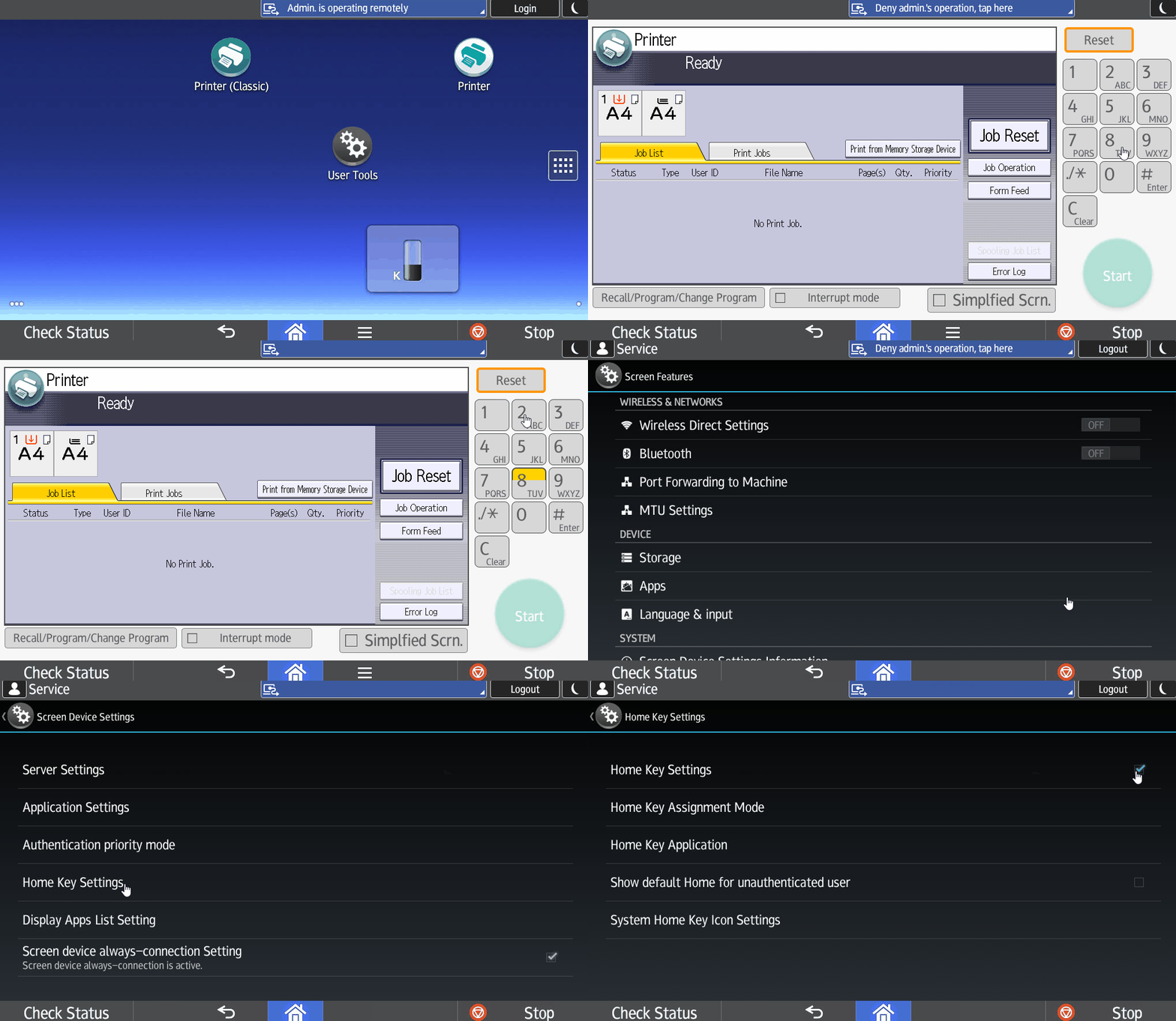
These settings are intended to improve the usability of the Ricoh Android NDD Print Client solution. Please follow these steps:
-
Open a classic printer application (e.g.: classic copy) and press Reset > 806182##C;
-
Access the Screen Device Settings option;
-
Access the Home Key Settings option;
-
Check the Home Key Settings function and access the Home Key Assignment Mode option;
-
Check the UI Change Mode function;
-
Return to the Home Key Settings option and access the Home Key Application option;
-
Check the NDD Print Client solution;
-
Return to the Home Key Settings option and access the System Home Key Icon Settings option;
-
Check the desired option.
-
Key Enable/Icon Visible: the default icon (Home) is modified, but its functionality does not change;
-
Key Enable/Icon Invisible: the default icon (Home) will be invisible, but the area where it was the same will work normally;
-
Key Disable: disable the default icon (Home) and its function in that area.
-