
It allows adding NDD Print Releaser specific settings registry keys without accessing the Windows registry.
To add a setting
-
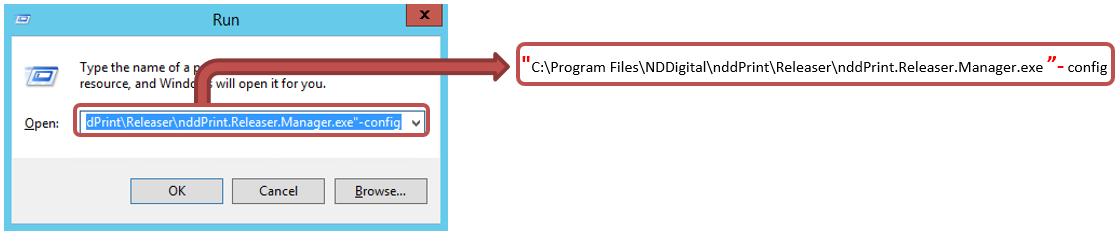
open the Run Windows and type “Instalation folder\NDDigital\nddPrint\Releaser\nddPrint.Releaser.Manager.exe”-config
-
tab Windows Registry
-
Enter the necessary data
-
Name: It corresponds to the field Value from the available settings list
-
Value: It corresponds to the Possible values from the available settings list
-
-
Add
List of available settings
The list presented below should be used whenever there is the need to add advanced configuration of the NDD Print Releaser.
The values with the “*” need the services of "NDDigital NDD Print Releaser" be manually restarted so the settings can take effect.
|
Value |
Possible values |
Default |
Description |
|---|---|---|---|
|
Path where these settings are saved: HKEY_LOCAL_MACHINE\SOFTWARE\NDDigital\nddPrint\Releaser |
|||
|
*AmountCardReaderKeyChars |
Positive integer |
|
When using the N5NetProx network reader, it allows you to indicate how many card code characters will be read. |
|
*CStartCardReaderKeyChars |
Positive integer |
|
When using the N5NetProx network reader, it allows you to indicate which character starts the card reading. |
|
*ForceNcParser |
True;False |
False |
When enabled (True), it forces the ReleaserCap to capture, through the NCParser component, information from: PagesMono, PagesColor, LastPageColor, Duplex, and Quality |
|
*ReleaserPrintAgentTimeOut |
Positive integer (seconds) |
|
Time interval for communication with the NDD Print Agent, used to release documents held at the station. |
|
*UpdatePjlQtyProperty |
True;False |
False |
When enabled (True) the NDD Print Releaser automatically adjusts, within the PJL file, the document copies number. |
|
*UserAliasesEnabled |
True;False |
False |
It enables you to download the user aliases available on NDD Print Host. |
|
*UseSqlNativeProvider |
True;False |
False |
When enabled (True), and NDD Print Releaser is using SQLServer database, the ReleaserCap will use the default SQL component instead of OleDB to access the database. |
|
VeryDocScriptParser |
True;False |
False |
When enabled (True), the parser of PDF documents will be performed using VeryDoc. |
Additional settings
-
Write the user's logon in the title of PDF documents printed by the GhostScript component
-
Use communication with the NDD Print Agent of the workstations via Nancy (HTTP)
-
Use HTTPS to communicate with the NDD Print Agent on the workstations
To remove a setting
-
open the Run Windows
-
type “Instalation folder\NDDigital\nddPrint\Releaser\nddPrint.Releaser.Manager.exe”-config
-
tab Windows Registry
-
select the setting
-
Remove