
Process prerequisite
To register a N5NetProx network reader directly in the NDD Print Releaser database, use the N5NetProx Reader tool, available in the installation folder: C:\Program Files\NDDigital\nddPrint\Releaser\nddPrint.Releaser. N5NetProxReaderTool.exe, if it has not been changed at the during the installation.
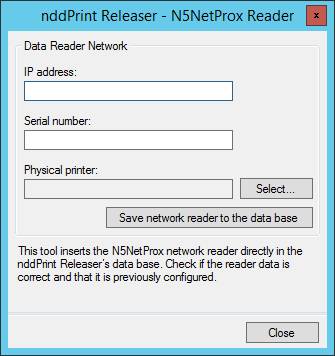
To register the reader directly in the database > installation folder > nddPrint.Releaser.N5NetProxReaderTool.exe > enter the required data > Save network reader to the data base
Please inform the required data, once:
IP address: Required field;
Serial number: Required field;
Physical printer: Select which printer the reader will belong to.
NOTE
Additional settings can be performed using the tool Ethernet Reader Monitor UDP.