
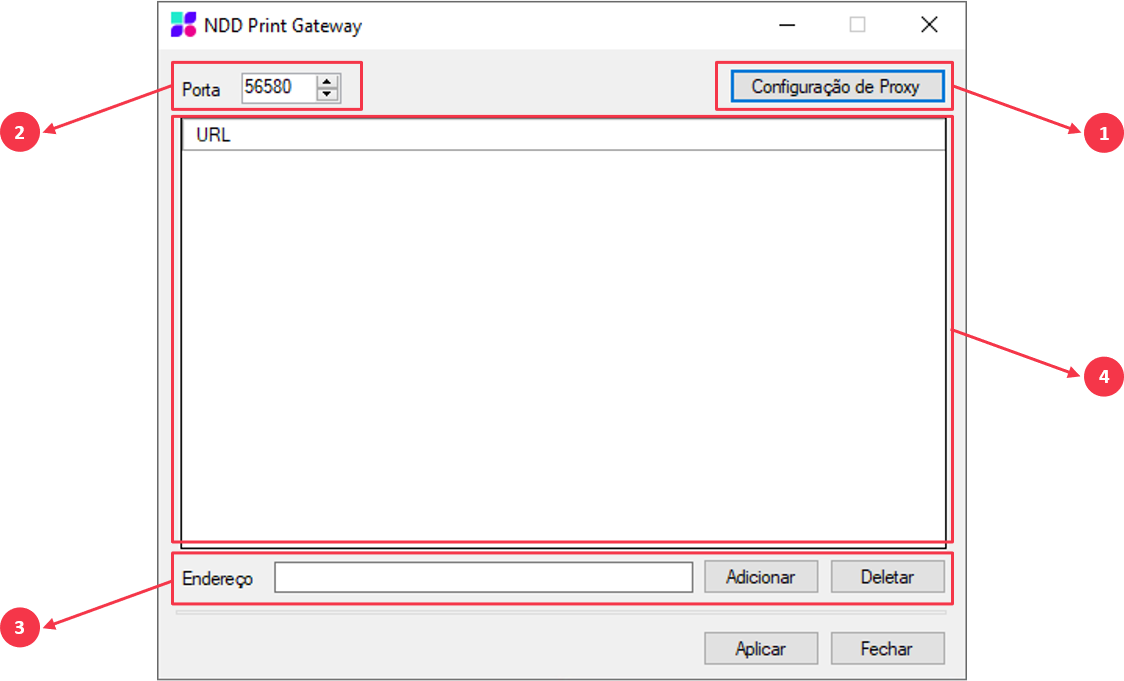
After opening the NDD Print Gateway you will find the following configuration items:
-
Proxy configuration: Option available to configure the Proxy, in case the environment requires it to connect to the Internet.
-
Port: Port that will be configured in the Clients, for communication with the NDD Print Gateway;
-
Address: Area available to add or remove the addresses (IP, Hostname or URL), of the Web Services and/or Servers that will make the connection to the internet;
-
URL: List of the addresses of the Web Services and/or Servers already registered;
The next step will be to configure the Clients to make connection with the NDD Print Gateway.
EXAMPLE
If you are using the HTTPS protocol, register the addresses of the Web Services and/or Servers as follows:
https://WEB SERVICE or SERVER ADDRESS