
Objective
Fill in the recipient's email with the email of the user authenticated on the device.
Before starting
-
The user must have an email address registered on NDD Print Portal 360;
-
SMTP configuration must have been performed on the equipment;
To learn how to configure SMTP, consult the manufacturer's manual.
Instructions
-
Access the equipment's web
-
Log in with your administrator login and password
-
Go to Function Settings, click Email
-
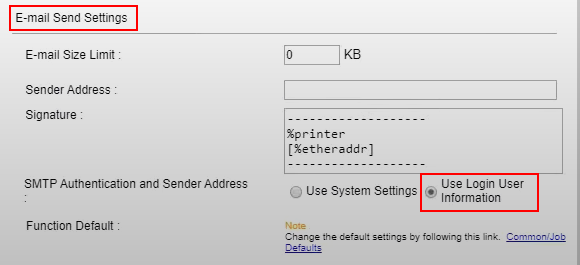
Under Email Send Settings, check the Use Login User information option
For some models, it is necessary to add the Send to Me application shortcut to the home screen:
-
On the device, click the System Menu/Counter button
-
Click on Home
-
Select + to show the function selection screen
-
Select the function and click OK
-
To change the icon position, click previous or next
Related pages