
You only need to do this when the DisableRestartServices setting is enabled. When disabled this procedure will be performed automatically.
For the correct operation of the NDD Print Agent it is necessary that the Windows File Pooling setting is disabled, in this way, the Windows spool files will be generated in XXXXX.SPL and XXXXX.SHD format, with XXXXX being a valid number to identify the print job.
Disable by printer
-
Click on Windows Start > type regedit
-
Go to HKEY_LOCAL_MACHINE\SYSTEM\CurrentControlSet\Control\Print\Printers\<printer name>
-
Locate SpoolDirectory
-
Right-click and select Modify...
-
Enter the path where the files will be stored, for example C:\Windows\System32\spool\printers and click OK
-
Restart the spool service.
|
💡 EXAMPLE 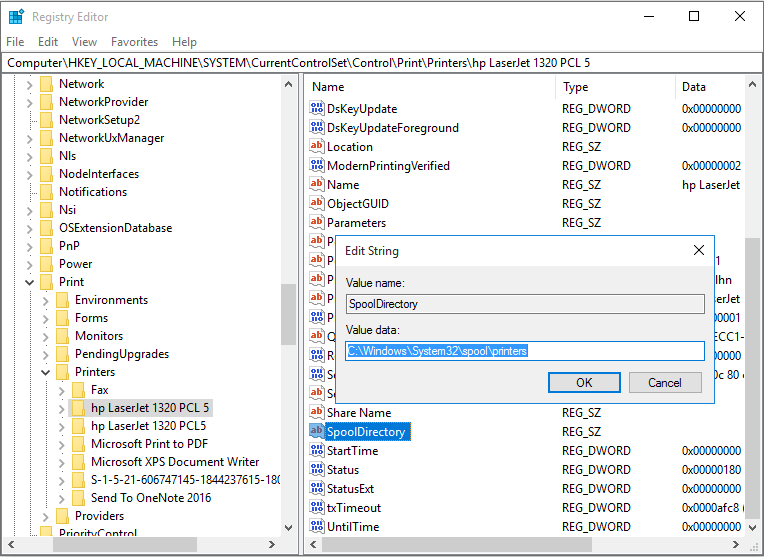
|
Disable for all printers
This method is not available for Windows Server 2003 and Windows XP.
-
Click on Windows Start
-
Type regedit
-
Go to HKEY_LOCAL_MACHINE\System\CurrentControlSet\Control\Print
-
Right-click on New
-
Select DWORD (32 bits) Value
-
Type DisableServerFilePooling and press ENTER
-
Right-click on DisableServerFilePooling and select Modify...
-
Enter the value 1 and click OK
-
Restart the spool service
|
💡 EXAMPLE 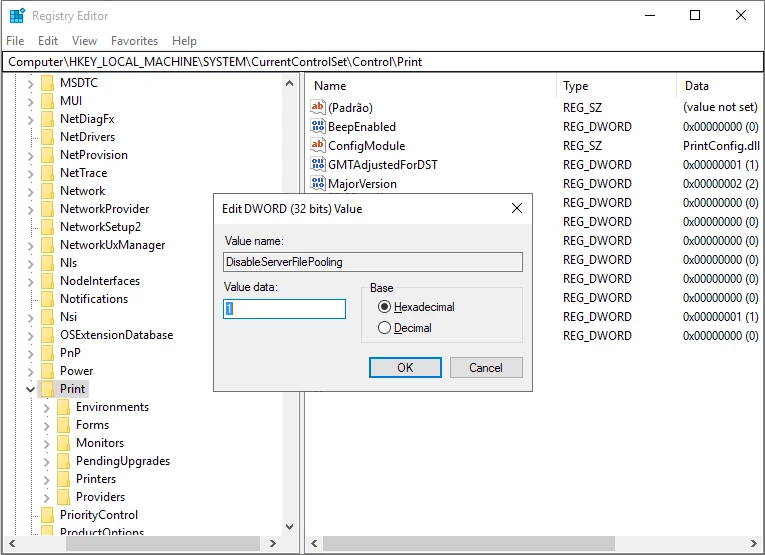
|